
Divoom
d03n3rfr1tz3
On Home Assistant 2026.11 or newer? Open it in the Marketplace
- Installs
- 157 sharing analytics
- GitHub stars
- 182
- Connection
- Works locally
- Upkeep
- Updated in the last 6 months
- Version
- v1.5.2,
- Category
- Messaging and notifications
- Kind
- Marketplace integration
- Needs
- Needs the Marketplace (HACS on 2026.10 and older)
- Domain
divoom- Issues
- Report an issue
Independent directory, made by the developer of Vulpo. Not affiliated with Home Assistant or the Open Home Foundation.
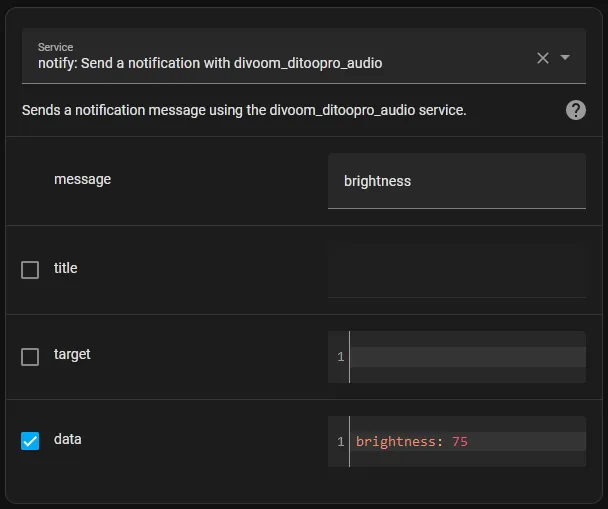
Screenshots From the README of d03n3rfr1tz3/hass-divoom.
About
Divoom is a Marketplace integration that sends commands and animations to Divoom pixel displays through Home Assistant actions. Each display mode has its own action, such as clock, light, image, scrolling text, alarm, timer, countdown, scoreboard and equalizer, with parameters available in the UI for use in automations and scripts. Further actions turn the display on or off, set brightness, and set the date and time. The connection is local and uses Bluetooth Classic, either through a Bluetooth adapter on the Home Assistant host or through an ESP32 running separate Divoom proxy firmware, and the device may need manual pairing first. It is set up in the UI, can be discovered on the network, and the older notify service still works, though a repair notice flags legacy use. No reading commands or sensors exist, so it only sends controls.
Automatic summary of the README and code of d03n3rfr1tz3/hass-divoom. Something wrong, or are you the maintainer and want your own text here? Get in touch
Supports
Works locally Talks to your devices on your own network. No vendor cloud in between.
Found by itself Home Assistant spots it on the network and offers to add it.
From the Marketplace Installed through the Marketplace, formerly HACS.
Actively maintained Its author released or pushed a change in the last six months.
Setting it up
Install it from the Marketplace and restart Home Assistant, then add it under Settings, Devices and services.
Divoom device
- Divoom device
- Bluetooth channel/port
- Local Bluetooth adapterOnly needed if Home Assistant has more than one Bluetooth adapter. Leave it empty and the system picks one.
Divoom device
- Divoom device
- Bluetooth channel/port
- ESP32-Divoom hostname/IPHostname or IP of your ESP32 with the ESP32-Divoom firmware.
Divoom device: port
- Port
Divoom device: type
- Type
Reconfigure Divoom device
- Local Bluetooth adapterOnly needed if Home Assistant has more than one Bluetooth adapter. Leave it empty and the system picks one.
- Bluetooth channel/port
- Type
Reconfigure Divoom device
- ESP32-Divoom hostname/IPHostname or IP of your ESP32 with the ESP32-Divoom firmware.
- Bluetooth channel/port
- Type
Texts from the code of d03n3rfr1tz3/hass-divoom.
Actions
- ClockShows the clock channel on a Divoom device. This mode is very limited on older devices such as the Aurabox or the Timebox Mini.Fields: Device, Clock style, Clock ID, 24-hour format, Show weather, Show temperature, Show date, Color, Show trending images
- LightShows the light channel on a Divoom device. This mode is very limited on the Aurabox, because it only supports 8 colors.Fields: Device, Brightness, Color, Effect
- Turn onTurns the display on, by setting the pixels to black, the brightness to 100 and also switching a specific power flag to 1. Because the pixels stay black and there is no automatic way back to the previously shown mode, you should send another action such as Clock afterwards.Fields: Device
- Turn offTurns the display off, by setting the pixels to black, the brightness to 0 and also switching a specific power flag to 0.Fields: Device
- BrightnessSets the brightness of a Divoom device.Fields: Device, Brightness
- ImageShows a static or animated image on a Divoom device.Fields: Device, Image file, Frame time
- TextShows text as a scrolling animation on a Divoom device. A longer text or a wide font might not fit into the frame limitation of ~60 frames.Fields: Device, Text, Font, Font size, Frame time, Text color, Background color
- DesignShows the design channel on a Divoom device.Fields: Device, Design
- EffectsShows the effects channel on a Divoom device.Fields: Device, Effect
- VisualizationShows the visualization channel on a Divoom device.Fields: Device, Visualization, Foreground color, Background color
- SignalShows the signal channel on a Divoom device.Fields: Device, Signal
- AlarmSets an alarm on a Divoom device. You might have to experiment with the options your Divoom device supports and what it actually changes. Unsupported values will be ignored or if possible directly zeroed, to prevent strange behavior.Fields: Device, Alarm slot, Time, Weekdays, Alarm mode, Trigger mode, Radio frequency, Volume
- CountdownShows the countdown tool on a Divoom device.Fields: Device, Start, Countdown
- TimerShows the timer tool on a Divoom device.Fields: Device, Start
- MemorialSets a memorial (reminder) on a Divoom device.Fields: Device, Memorial slot, Date and time, Name
- ScoreboardShows the scoreboard channel or tool on a Divoom device.Fields: Device, Player one, Player two
- Noise meterShows the noise meter on a Divoom device.Fields: Device, Start
- Sleep modeShows the sleep mode on a Divoom device, which plays soothing sounds, optionally with a timer and light.Fields: Device, Start, Sleep timer, Sound effect, Radio frequency, Volume, Color, Brightness, Volume sound 1, Volume sound 2
- Date and timeSets the date and time of a Divoom device.Fields: Device, Date and time
- EqualizerStarts the music equalizer on a Divoom device.Fields: Device, Equalizer, Original audio mode, Background audio mode, Streaming audio mode
Troubleshooting
- Repair noticesNotices it can show in Settings, Repairs:Divoom YAML configuration is deprecated, Legacy Divoom notify actions still in use
From the README
Allows you to send commands to your Divoom device through Home Assistant actions. Every mode your device supports has its own action, like divoom.clock or divoom.light, with all its parameters available in the UI. It allows you to control your Divoom device in your automations and scripts however you want. Currently no reading commands or sensors are implemented. Just send controls/animations to your Divoom device through the actions.
The older notify.NOTIFIER_NAME service still works, so existing automations keep running. See

Shows in Vulpo
Entity card (read-only).Information
- Installs
- 157 sharing analytics
- GitHub stars
- 182
- Connection
- Works locally
- Upkeep
- Updated in the last 6 months
- Version
- v1.5.2,
- Category
- Messaging and notifications
- Kind
- Marketplace integration
- Needs
- Needs the Marketplace (HACS on 2026.10 and older)
- Domain
divoom- Issues
- Report an issue