
Afvalbeheer
pippyn
On Home Assistant 2026.11 or newer? Open it in the Marketplace
- Installs
- 3.4k sharing analytics
- GitHub stars
- 379
- Connection
- Not stated
- Upkeep
- Updated in the last 6 months
- Version
- v6.5.34,
- Category
- Waste and recycling
- Kind
- Marketplace integration
- Needs
- Needs the Marketplace (HACS on 2026.10 and older)
- Domain
afvalbeheer- Issues
- Report an issue
Independent directory, made by the developer of Vulpo. Not affiliated with Home Assistant or the Open Home Foundation.
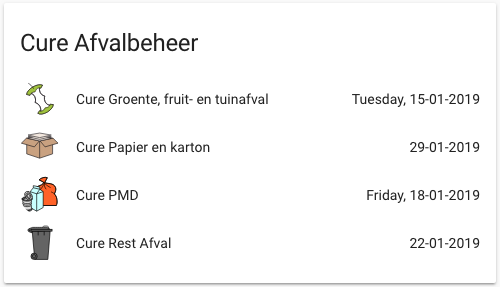
Screenshots From the README of pippyn/Home-Assistant-Sensor-Afvalbeheer.
About
Afvalbeheer adds waste collection sensors and a calendar for many Dutch and Belgian waste collectors. Data is fetched from the collectors' REST APIs, and the integration is set up through the Home Assistant UI. It creates a sensor for each chosen waste type, plus optional sensors for today, tomorrow and the next upcoming collection. A calendar entity lists upcoming collection events for the address and selected waste types, and it can be used in dashboards and automations. Options cover date format, icon set, name prefix, custom names, update interval and the language of sensor text. Waste type names from the API can be renamed with a custom mapping, and several instances can be added for different addresses.
Automatic summary of the README and code of pippyn/Home-Assistant-Sensor-Afvalbeheer. Something wrong, or are you the maintainer and want your own text here? Get in touch
Supports
From the Marketplace Installed through the Marketplace, formerly HACS.
Actively maintained Its author released or pushed a change in the last six months.
Provides
- Sensors
- Calendars
Setting it up
Install it from the Marketplace and restart Home Assistant, then add it under Settings, Devices and services.
Afvalbeheer Setup
- Waste Collector
Address Information
- Postal Code
- Street Number
- Suffix (optional)
- City Name
- Street Name
Omrin Credentials (Optional)
- Email addressYour Omrin account email address (optional)
- PasswordYour Omrin account password (optional)
Custom Mapping (Optional)
- Use Custom MappingEnable custom mapping to rename waste types from the API
- Custom Waste Type MappingCustom waste type mappings in JSON format
Configuration
- Waste TypesSelect the waste types you want to track
- Custom NameCustom name for this integration instance (optional)
- Use Name PrefixAdd waste collector name as prefix to sensor names
- Date FormatDate format for sensor values (Python strftime format)
- Upcoming SensorsCreate additional sensors for today, tomorrow, and next upcoming collection
- Date OnlyShow only date without day names (overrides other day settings)
- Date as TimestampUse timestamp objects instead of formatted text (for automations)
- Show Day of WeekInclude day of week in sensor values (e.g., 'Monday, 01-01-2024')
- Day Names OnlyShow only day names for nearby dates (today, tomorrow, day names)
- Always Show Day NamesAlways show day names, even for dates more than a week away
- IconsIcon set used for the waste type sensors
- Update Interval (hours)How often to check for updated waste collection data (0 = use default interval)
- Address IDAddress ID for Ximmio-based collectors (if required by your waste collector)
- Customer IDCustomer ID for Ximmio-based collectors (if required by your waste collector)
- Sensor text languageLanguage used by integration-controlled text such as dates, helper sensor names, and notifications
After setup
- Waste Collector
- Postal Code
- Street Number
- Suffix (optional)
- City Name
- Street Name
- Email addressYour Omrin account email address (optional)
- PasswordYour Omrin account password (optional)
- Use Custom MappingEnable custom mapping to rename waste types from the API
- Custom Waste Type MappingCustom waste type mappings in JSON format
- Waste TypesSelect the waste types you want to track
- Custom NameCustom name for this integration instance (optional)
- Use Name PrefixAdd waste collector name as prefix to sensor names
- Date FormatDate format for sensor values (Python strftime format)
- Upcoming SensorsCreate additional sensors for today, tomorrow, and next upcoming collection
- Date OnlyShow only date without day names (overrides other day settings)
- Date as TimestampUse timestamp objects instead of formatted text (for automations)
- Show Day of WeekInclude day of week in sensor values (e.g., 'Monday, 01-01-2024')
- Day Names OnlyShow only day names for nearby dates (today, tomorrow, day names)
- Always Show Day NamesAlways show day names, even for dates more than a week away
- IconsIcon set used for the waste type sensors
- Update Interval (hours)How often to check for updated waste collection data (0 = use default interval)
- Address IDAddress ID for Ximmio-based collectors (if required by your waste collector)
- Customer IDCustomer ID for Ximmio-based collectors (if required by your waste collector)
- Sensor text languageLanguage used by integration-controlled text such as dates, helper sensor names, and notifications
Texts from the code of pippyn/Home-Assistant-Sensor-Afvalbeheer.
From the README
Afvalbeheer provides Home Assistant sensors and a calendar entity for multiple Dutch and Belgian waste collectors using REST APIs.
⚠️ Important Notice: YAML configuration is deprecated as of v6.0.0. All new installations and configurations should use the Home Assistant UI (Config Flow). Existing YAML configurations will automatically be imported and should be removed from configuration.yaml after migration.
- Sensor entities for each waste type and for upcoming collections (today, tomorrow, next upcoming)
- Calendar entity showing all upcoming waste collection events (see below)
- Support for custom naming, icons, translations, and advanced mapping
- Easy configuration through Home Assistant UI (Config Flow)

Shows in Vulpo
Calendar card, Chart card, Apple Watch.Information
- Installs
- 3.4k sharing analytics
- GitHub stars
- 379
- Connection
- Not stated
- Upkeep
- Updated in the last 6 months
- Version
- v6.5.34,
- Category
- Waste and recycling
- Kind
- Marketplace integration
- Needs
- Needs the Marketplace (HACS on 2026.10 and older)
- Domain
afvalbeheer- Issues
- Report an issue
You might also like
 Waste Collection Schedule26.2k installs · Home Assistant integration framework for (garbage collection) …Open

 UK Bin Collection Data1.2k installs · UK Council Bin Collection Data Parser Outputting Bin Data as a …Open