Sur Home Assistant 2026.10 ou une version antérieure ? L’ouvrir dans HACS
- Installations
- 51 partagent leurs statistiques
- Étoiles GitHub
- 26
- Connexion
- Utilise le cloud du fournisseur
- Maintenance
- Mise à jour au cours des 6 derniers mois
- Version
- v0.25.0,
- Catégorie
- Sécurité et protection, Caméras
- Type
- Intégration de la Marketplace
- Prérequis
- Nécessite la Marketplace (HACS sur Home Assistant 2026.10 et les versions antérieures)
- Domaine
fermax_blue- Problèmes
- Signaler un problème
S’affiche dans Vulpo : carte Bascule rapide, carte Serrure, carte Caméra, carte Bouton, Apple Watch, centre de contrôle.
Annuaire indépendant, créé par le développeur de Vulpo. Non affilié à Home Assistant ni à l’Open Home Foundation.
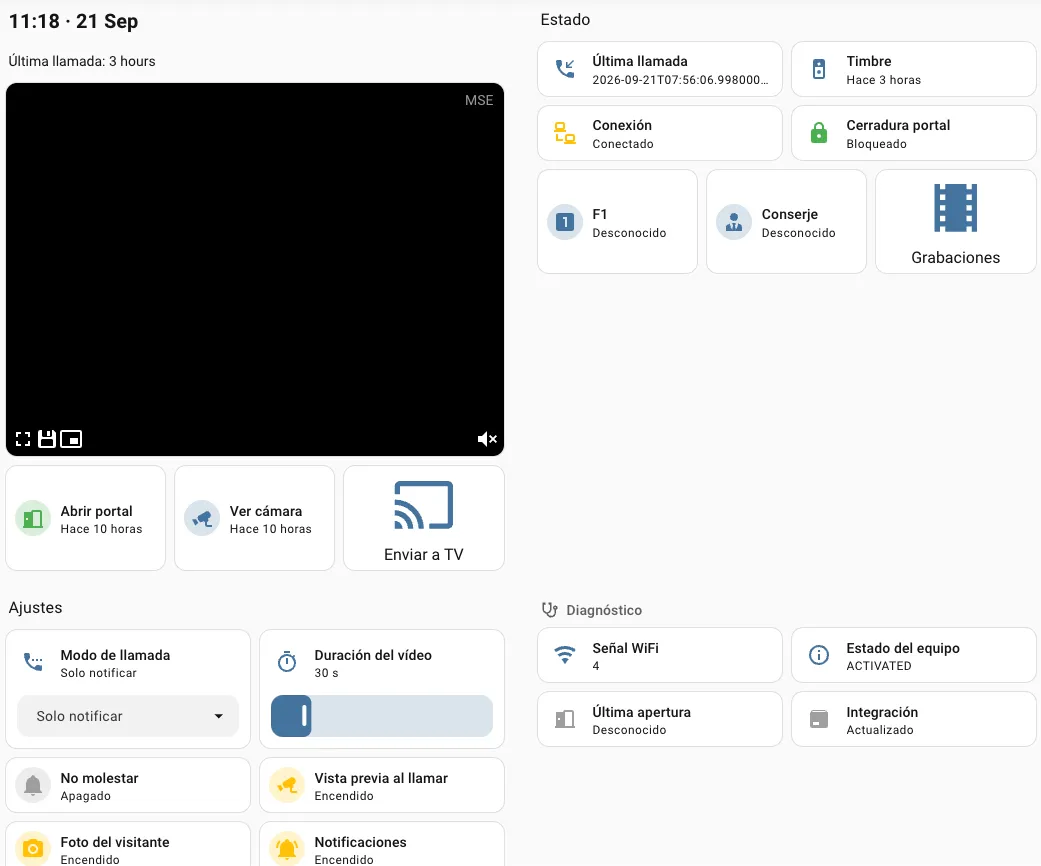
Captures d’écran Extraites du README de bvis/fermax-blue-hass.
À propos
Fermax Blue est une intégration de la Marketplace pour Home Assistant.

S’affiche dans Vulpo :
carte Bascule rapide, carte Serrure, carte Caméra, carte Bouton, Apple Watch, centre de contrôle.Prise en charge
- Utilise le cloud du fournisseurNécessite une connexion internet et un compte chez le fournisseur.
- Depuis la MarketplaceS’installe depuis la Marketplace, anciennement HACS.
- Maintenance activeSon auteur a publié une version ou poussé une modification au cours des six derniers mois.
Fournit
- Caméras
- Serrures
- Interrupteurs
- Capteurs
Mise en place
Installe l’intégration depuis la Marketplace et redémarre Home Assistant, puis ajoute-la dans Paramètres > Appareils et services.
Connexion Fermax Blue
- Mot de passe
Se reconnecter
- Mot de passe
Après la mise en place
- Intervalle d'interrogation (minutes)
- Rétention des enregistrements (jours)
- Chemin du fichier audioDiffusé par l'interphone quand le mode d'appel est Réponse automatique. Laissez vide pour désactiver la réponse automatique.
Textes issus du code de bvis/fermax-blue-hass.
Entités
- Capteurs binairesConnexion
- BoutonsAperçu caméra, F1 auxiliaire, Changer de caméra, Appeler le gardien
- CamérasVisiteur
- ÉvénementsSonnette, Porte ouverte, Aperçu caméra
- SerruresPorte
- NombresDurée du flux
- SélecteursMode d'appel
- CapteursSignal WiFi, État, Dernière ouverture, Dernier appel
- InterrupteursNotifications sonnette, Ne pas déranger, Photo visiteur, Aperçu à la sonnerie
Actions
- Envoyer de l'audio à l'interphoneDiffuse un fichier audio ou un message parlé par le haut-parleur de l'interphone pendant une session en direct.
- Interphone
- Fichier audio
- Message
- Langue
Dépannage
- DiagnosticsTélécharge un fichier de diagnostics à joindre à un rapport de bug.
Extrait du README
Home Assistant custom integration for Fermax Blue video door entry systems (DUOX PLUS / blueStream).
This integration simulates a Fermax Blue mobile app client, connecting to the Fermax cloud API and receiving real-time push notifications via Firebase Cloud Messaging when someone rings your doorbell.
- Live video streaming — Real-time video from the intercom camera (~720x480) with the intercom's audio, over WebRTC in the standard camera cards and the companion apps; MJPEG is still served. Opening…
- Talk-back — Speak to the visitor from a card that captures the microphone; the first word answers the call (see Live view and talk-back)
- Answer from your phone — A ready-made dashboard and notification blueprint: ring → notification with the visitor's photo → see, hear, talk and open the door from the companion app (see Answer calls…
- Camera preview — Last captured frame persists across HA restarts, always visible in the camera card
- Doorbell detection — Real-time push notification when someone rings (via Firebase Cloud Messaging)
- Door opening — Open your building's door remotely (lock entity + button)
- On-demand camera — Triggers the intercom camera without a doorbell ring via auto-on
- F1 auxiliary button — Trigger the intercom's F1 function
- Switch camera — Step through the cameras of multi-camera installations while a live stream is up (the intercom only accepts the change inside a session)
- Call guard — Call the building's guard/janitor
Informations
- Installations
- 51 partagent leurs statistiques
- Étoiles GitHub
- 26
- Connexion
- Utilise le cloud du fournisseur
- Maintenance
- Mise à jour au cours des 6 derniers mois
- Version
- v0.25.0,
- Catégorie
- Sécurité et protection, Caméras
- Type
- Intégration de la Marketplace
- Prérequis
- Nécessite la Marketplace (HACS sur Home Assistant 2026.10 et les versions antérieures)
- Domaine
fermax_blue- Problèmes
- Signaler un problème